

.jpg?width=64&height=64&name=MicrosoftTeams-image%20(26).jpg)
Every December, IT and engineering leaders go through the same ritual. You plan your budget, allocate headcount, and lock in priorities for the year ahead. Then February arrives, and someone has a new idea. Or a new AI tool surfaces that your team wants to evaluate. Or a competitor ships something that changes the conversation entirely.
It’s not necessarily that the ideas are bad. The problem is that the budget is already allocated.
Here is the thing most organizations overlook: if you are running workloads in AWS, there is a good chance your cloud bill is already carrying budget that you could redirect. Cloud waste remains stubbornly high across the industry. Organizations waste 27% of their cloud spend on unused or non-optimized resources (Flexera State of Cloud Report 2025). For a company spending $500,000 per year on AWS, that is $135,000 sitting on the table.
I started paying close attention to cloud costs in 2009, back when I was learning AWS on my own credit card. If you want to get careful about waste fast, link your cloud spend to a personal bank account. Fifteen years later, I apply that same mindset to every client engagement at Sketch. This post walks through specific steps that actually move the needle.
Prefer video content? Watch the entire webinar for free here:
Moving to the Cloud Is Not the Same as Saving Money
Cloud vendors have spent a lot of money marketing cost savings as a built-in benefit of migration. I’m not a marketer, though, and the reality is more complicated.
Moving to AWS does not automatically reduce your costs. In fact, if you migrate existing workloads without changing how they are architected or how your software is written, you are essentially running an on-premises data center on rented hardware. The bill often comes out higher, not lower.
This is one of the most common reasons cloud migrations disappoint. Teams lift and shift their existing servers into EC2 instances, configure them the same way they always have, and then wonder why the savings never materialize. The cloud has cost efficiency potential built into it, but you have to go after it deliberately. It’s not automatic.
Related Reading: How to Set up an SFTP Server Backed by S3 on AWS
Managing cloud spend has been a top challenge for organizations for years, according to Flexera (and our own clients). We have to accept that the cloud can’t magically save us money. Cost control requires active effort.
Now we have the bad news out of the way. The good news is that there are plenty of cloud cost optimization levers. Here’s how you can pull them.
Step 1: Right-Size Your Instances Before Anything Else
Right-sizing means matching the CPU, memory, and storage allocated to a server to the actual demand that server handles. It sounds straightforward, but most environments are significantly over-provisioned.
The reason is predictable. When a team first provisions a server, they build for worst-case traffic. That is sensible. But workloads change, traffic patterns shift, and nobody ever goes back to shrink the server. AWS charges you for the running resources you provision, not simply the resources you use. So a server that sits at 15% CPU utilization all day is costing you roughly six times more than it needs to.
One tool you can use is AWS CloudWatch. It tracks CPU utilization, memory, and other metrics for your EC2 instances, RDS databases, and ECS containers. Look at utilization patterns over time, not just a single day. You want to see what your peak load actually looks like across weeks and months. If peak CPU regularly stays below 40%, the instance is almost certainly oversized.
There’s a counterintuitive point here that’s worth understanding: running more, smaller servers is often cheaper than running fewer, larger ones. The reason is auto-scaling. When you auto-scale a fleet of small instances, your infrastructure tracks the demand curve closely. You spin up capacity when you need it, then shed it when you don’t. A large server, on the other hand, sits provisioned at full size regardless of necessity or utilization.
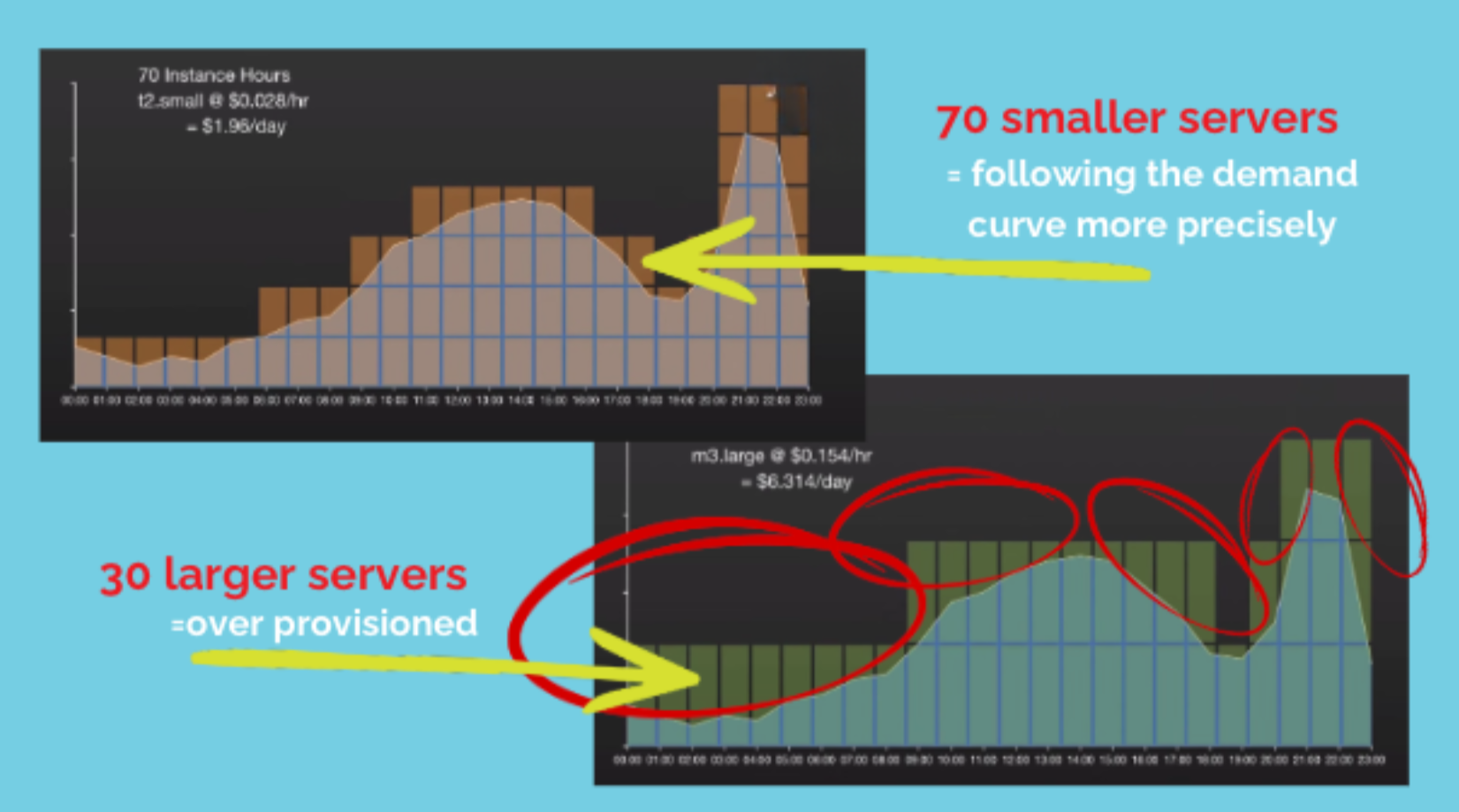
This visual representation shows how you can save money by using more small servers instead of fewer big ones.
Right-sizing should always come before purchasing reserved instances or savings plans. This is critical. A reserved instance typically locks in a billing commitment for one to three years (unless you go through an AWS partner, but we’ll get into that in Step 2). If you lock in a commitment on an oversized instance, you have wasted the discount and the opportunity. Get the sizing right first, then make the commitment.
Step 2: Understand Reserved Instances and Savings Plans
Reserved instances and savings plans are the most commonly discussed AWS cost levers, and there are lots of misconceptions here.
It’s vital to know that a reserved instance is a billing mechanism, not an infrastructure change. You are not changing your servers. You are not changing your architecture. You are making a commitment to AWS that you will use a certain amount of compute capacity over the next one to three years, and in return, AWS gives you a lower rate. Amazon EC2 reserved instances can reduce your compute costs by up to 72% compared to on-demand pricing.
Savings plans work similarly but with more flexibility. Rather than committing to a specific instance type, you commit to a dollar amount of compute usage per hour. This makes savings plans a better fit for environments where instance types change frequently.
There are a few important things I always think about when it comes to reserved instances:
- 1-year vs. 3-year terms: Three-year commitments offer deeper discounts, but they only make sense for workloads you are confident will remain stable. If there is any chance the workload shrinks or migrates, a one-year term is safer.
- The reserved instance marketplace: If you over-commit and end up with reserved instances you do not need, you can usually sell them in the AWS Marketplace. It’s like subleasing your apartment. This is a reasonable safety valve for compute instances, but it does not work cleanly for databases. Be careful about locking in reserved instances for RDS and other managed database services. Those are harder to exit.
- Bulk purchasing through resellers: AWS partners who also operate as cloud resellers can often access reserved instances at deeper discounts than what is available publicly. This happens because the reseller's distributor purchases reserved instances in large volume. Some AWS partners can also offer 30-day reserved instances, which are not available to most customers directly. This gives teams with seasonal or variable workloads a way to get discounted pricing without a long-term commitment.
As an AWS Select Tier Partner and reseller, Sketch has access to various partner-level pricing options, which allows us to pass savings to our clients. More on that at the end of this post.
Step 3: Look at Your Architecture and Code
This is the step most cloud cost optimization discussions glaze over. The way your developers write software and the way your systems are architected have a direct impact on what you pay for compute.
I try to keep a few of tips in mind for this step:
a.) Use cloud-native managed services where you can.
A common pattern is to build all application logic on EC2 and run it on a general-purpose server. In many cases, parts of that workload can be offloaded to managed AWS services like SQS for message queuing, Lambda for event-driven functions, or DynamoDB for certain data access patterns. When you offload those workloads, you reduce the compute required on the main server. A smaller server costs less.
b.) Consider JAMstack for front-end applications.
If your team is running a React, Vue, or Angular front end on a web server, there is a good chance you do not need a web server at all. Deploying the front-end application to an S3 bucket and serving it through CloudFront can drop hosting costs to near zero for most traffic levels. S3 storage is cheap. CloudFront distribution is cheap. A web server running 24/7 is not.
c.) Choose the right language to optimize cloud costs.
Language choice also matters more than most people realize. Rust, for example, has an extremely small CPU and memory footprint compared to many other languages. Teams willing to use efficient languages and algorithm choices can often run the same workloads on significantly smaller instances.
Cloud Cost Optimization Example: Nonprofit saves 75% by optimizing cloud architecture.
We recently worked with a non-profit organization in Tennessee that was already running in AWS (and assumed they were already saving money). After reviewing their architecture and refactoring key parts of their application to use managed services and right-sized infrastructure, we cut their monthly cloud bill by 75%. Not only were there no trade-offs or sacrifices, but the performance of the application actually improved.
Step 4: Fix Your Tagging and Get Cost Visibility
In larger organizations, cloud cost accountability breaks down fast. You might have a centralized infrastructure team that receives the overall AWS bill, but the actual usage is spread across a dozen different product teams and departments. Without clean tagging, you can’t see where the money is going or hold anyone accountable.
Inconsistent tagging is more common than I would have imagined. One team tags an application as "app," another tags it as "application," and another misspells it entirely. When finance runs a cost allocation report, none of those resources roll up correctly.
It’s possible to fix this retroactively, especially if you have the right tooling. Partner-level tools exist that can identify and correct tagging inconsistencies directly in your AWS environment, which means the corrected tags flow into your existing cost reports automatically.
Visibility tools that incorporate AI forecasting are also worth looking at. Rather than trying to predict cloud spend from a static budget model, these tools analyze historical usage patterns and forecast spend for the next several months with reasonable accuracy. For finance teams trying to budget cloud costs, that kind of predictability is genuinely useful. That’s why we set our cloud management clients up with FinOps tools.
What About Security? Is There Some Sort of Trade-Off?
This question comes up often, especially from clients in healthcare, financial services, and the public sector. The concern is reasonable: if we are cutting cloud costs, are we cutting corners on security or elsewhere?
The answer is “no,” but I would give some caveats here.
First, most cloud cost optimization work touches billing mechanics and resource sizing. It does not touch your security controls. Right-sizing instances, purchasing reserved instances, restructuring how you deploy front-end code — none of that changes your security posture.
Where costs can go up is in security tooling itself. Web application firewalls, compliance tooling, logging and monitoring services tend not to carry significant discounts from cloud providers. Security services are one of the places where discount programs have less coverage.
As cost-conscious as I am, this is totally fine by me. The cost of a data breach (regulatory fines, remediation, the reputational damage) is orders of magnitude higher than the cost of running a WAF. Do not cut security to optimize cloud spend. Treat them as separate budget lines.
A Note on GovCloud and Enterprise Pricing Agreements
If your organization operates in the AWS GovCloud environment, the optimization playbook is different. GovCloud environments have stricter access controls, and many third-party optimization tools cannot operate inside them.
There are FedRAMP-compliant tooling options designed specifically for GovCloud. These are deployed directly into your environment as a standalone installation rather than as a SaaS connection, which means your billing and infrastructure data never leaves the GovCloud boundary. This approach does carry a licensing cost, unlike the free assessment we offer for standard AWS environments, but it is possible and we have done it.
If your organization has a Private Pricing Agreement (PPA) or Enterprise Discount Program (EDP) with AWS, that creates a different challenge. Most standard reserved-instance optimization tools and reseller discounts do not work alongside these agreements. Before assuming you are locked out of savings, it is worth asking. Some reseller structures can still operate alongside PPAs and EDPs in ways that most people are not aware of.
A Practical Checklist: Where to Start
If you want to take action after reading this, here is the order I recommend:
- Pull CloudWatch metrics for your most expensive EC2 instances. Look at CPU utilization over the past 30 to 90 days. Anything consistently below 40% at peak is a candidate for right-sizing.
- Right-size before you commit. Do not purchase reserved instances or savings plans for instances that are not yet right-sized. Locking in a discount on an oversized instance does not help you.
- Open your AWS billing console and look at the Reserved Instances and Savings Plans recommendations tab. AWS generates these automatically based on your existing usage.
- Look at your architecture. Are you running front-end applications on web servers that could live on S3 and CloudFront? Are there application components that could move to managed services like Lambda or SQS?
- Audit your database reserved instances separately. These are harder to exit than compute reserved instances. Approach them with caution.
- Check your tagging. Run a cost allocation report and see if resources are rolling up to the right teams and applications. Inconsistent tags are a sign of a deeper cost visibility problem.
- If you are in a multi-cloud environment, make sure your tooling covers all three major providers. AWS, Azure, and GCP all have cost optimization levers, and managing them separately creates gaps.
How Sketch Can Help
At Sketch, we offer a free cloud cost assessment for organizations running on AWS, Azure, or Google Cloud. The assessment takes about an hour. We sign an NDA, review your billing data, and run it through partner-level tooling. That gets you a heat map of your environment's utilization patterns and a set of specific, prioritized savings opportunities.
If the assessment finds savings (and it almost always does) we can help you capture them. Our only payment comes as a small commission out of what we save you. That means there are no upfront charges. You can only save money, never lose it.
If we don’t find meaningful savings, you don’t pay us. In this case, you spent about an hour of your time to get validation that your environment is well-managed. I’ve never seen us fail to find savings, but imagine it must bring nice peace of mind.
For organizations with more complex needs, including application refactoring, architecture review, or GovCloud environments, the road to cloud cost optimization starts the same way: a 30-minute conversation to help us understand your situation.
All you have to do is contact us. In the spirit of cost optimization, I'll never try to bill you for talking shop.