


Most AI pilots fall somewhere between “science experiment” and “complete waste of time.” Some organizations are achieving meaningful outcomes with AI, though. We've seen it first-hand: clients using AI to write loan narratives or generate resumes instantly.
To figure out how these clients are achieving successful AI implementations when the research says most are failing, I signed up for an agentic AI class through Harvard’s Data Science Initiative and started studying. This guide covers what I’ve learned, and how I’ve put it into practice.
What You Should Know About Working With Agentic AI
Without getting lost in academic definitions, agentic AI sets itself apart from other AI with two defining characteristics: agency and autonomy.
- Agency means the system “understands” a goal.
- Autonomy means it can execute toward that goal without step-by-step instructions.
Traditional automation follows a script. Agentic AI pursues an objective. It's the difference between blindly following a recipe and being able to create a meal from whatever's in the fridge.
Using general AI helps you complete the same tasks faster. Agentic AI allows you to completely redesign workflows. This matters because the first step is rethinking how you get from start to finish on the tasks you’re planning to hand over to agentic AI.
The Five Types of Agents
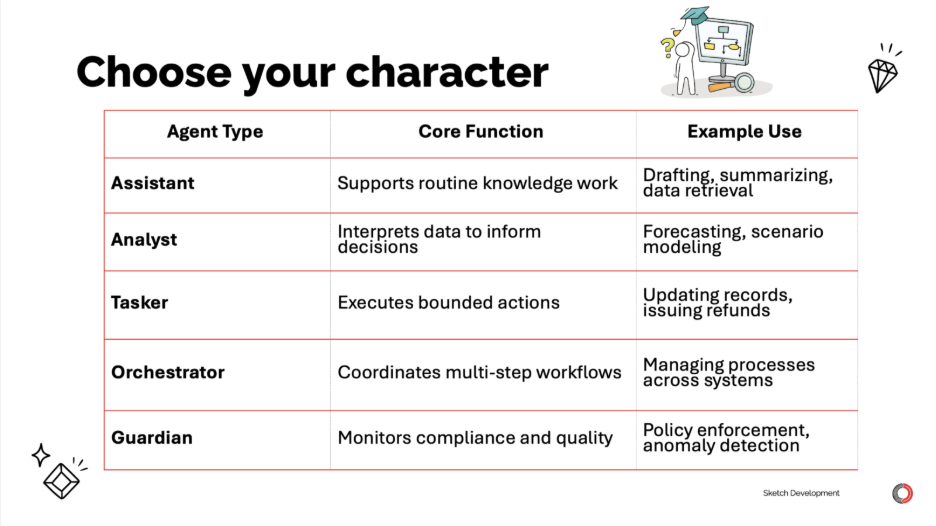
Within the realm of agentic AI, there are five types of AI agent:
- Assistant agents — support routine knowledge work like drafting, summarizing, and data retrieval.
- Analyst agents — interpret data to inform decisions through forecasting, scenario modeling, and pattern recognition.
- Tasker agents — execute bounded actions like updating records, routing tickets, and handling operational tasks.
- Orchestrator agents — coordinate multi-step workflows, managing processes across systems and deciding which agents to deploy.
- Guardian agents — monitor compliance and quality, enforcing policies and ensuring other agents operate within boundaries.
Some of the most effective implementations combine multiple types. I don’t always think in terms of these five agent types, but running through them helps when I’m trying to figure out how to combine AI tools to solve a particular problem.
Start With Vision, Not Technology
Failed initiatives start with technology and work backward. Some executive reads about ChatGPT and says, "We need to be using this." Then teams scramble for use cases. This is like how startups fail when they fall in love with the solution instead of the problem. Product thinking still applies.
Successful implementations start with what the course called "vivid leadership" rather than "abstract leadership."
Abstract leadership sounds like:
- "We will leverage AI to drive 30% efficiency gains"
- "AI is critical to our digital transformation"
Vivid leadership sounds like:
- "Next quarter, AI handles routine tickets for account recovery and password resets so we can focus on preventing outages."
- "By March, you'll mentor AI to spot loan narrative patterns so we can reduce the time of writing a loan narrative from eight hours to one."
Vivid leadership tells people exactly what changes, when it changes, and how their work becomes more interesting. It’s kind of like setting S.M.A.R.T. (specific, measurable, achievable, relevant, time-bound) goals. It creates clarity instead of confusion.
The AGENT Framework
After establishing some foundational knowledge about what agentic AI is, the course introduced a five-phase framework for transforming workflows: A.G.E.N.T.
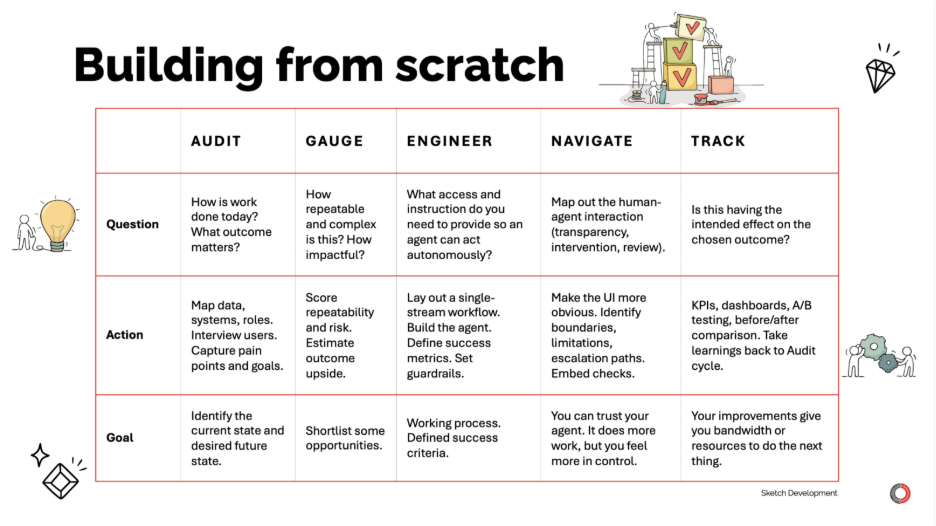
Adapted from Dain Consulting's AGENT framework
1 – Audit — Map Current State
Document your workflow in detail. Start with the trigger. What initiates this process? Then map every step: who does what, what data they use, what decisions they make.
Pay attention to where judgment happens ("I just know" moments), how exceptions get handled, and where data lives. Don't rush this. Interview people doing the work.
2 – Gauge — Assess Fit
Evaluate two dimensions: repeatability (how often this happens) and complexity (how much judgment is required).
The sweet spot for agentic AI is high repeatability with moderate complexity. These workflows happen often enough to justify effort but require enough judgment that simple automation falls short.
It helps to ask yourself questions like these:
- Do we have machine-readable data?
- Can we make the decision criteria explicit?
- What's the cost of errors?
- How stable is this process?
3 – Engineer – Redesign for Agents
Don't automate the current process step by step. Redesign for how agents work best.
Make data machine-readable. Make decisions explicit. Design human-agent collaboration points deliberately. Build for explainability from day one.
For example, one case study in the class I took showed B2B sales deal negotiation preparation dropping from 35+ days to 5 days. An orchestrator agent coordinated analyst agents to gather customer data, market intelligence, and pricing scenarios while account managers focused on strategy. Preparation effort dropped 90%.
4 – Navigate – Define Collaboration
Specify three types of decisions:
- Independent: Agent decides and acts autonomously (routine, low-risk, clear criteria)
- Recommendation: Agent analyzes and recommends, human approves (judgment calls)
- Escalation: Agent recognizes complexity and hands off (exceptions)
Agents must explain what they decided, why they decided it, and how confident they are. This transparency builds trust and creates feedback loops.
5 – Track – Measure Outcomes
Avoid vanity metrics (number of agents deployed, number of interactions). Track business outcomes instead:
- Error rates
- Cycle time reduced
- Customer satisfaction
- Decisions accelerated
- Employee time freed for high-value work
It’s totally ok (even recommended) to start with 80% data quality and gradually improve through usage. If you wait for perfect data governance, you’re practically begging your competitors to take a head start.
Breaking the Pilot Trap
The course identified seven keys to scaling:
- Leadership mindset shift: Model curiosity over authority
- Value-first execution: Measure business outcomes, not activities
- Data liberation: Make knowledge accessible with "good enough" quality
- Distributed AI literacy: Give domain experts tools and permission to experiment
- Adaptive organization: Create cross-functional pods with direct data access
- Trust through action: Build governance by doing, not planning
- Momentum over perfection: Launch fast, learn faster
Each addresses a specific obstacle. Most organizations fail because they miss at least one.
Traditional hierarchies create sequential decision flows that take weeks or months. Adaptive pod networks create value in days through cross-functional teams with autonomous decision-making authority.
Governance should emerge from practice. Co-design guardrails with users as you build. Document decisions in real time. Test boundaries through controlled pilots. Scale what works.
What This Means for Your Team
Jobs don't necessarily disappear. They rise. When agents handle routine execution, humans shift to orchestration, strategy, and exception handling.
Everyone has access to AI models. Your competitive advantage lies in your proprietary data, domain expertise, and how you apply agents to your specific context. As generic knowledge becomes free, specialized knowledge becomes more valuable.
Agentic AI Examples for Beginners
A lot of these are marketing-centric examples (because that’s my job). The good news is that these workflows are highly adaptable, so you’ll probably find ways to make them more relevant to your own job. The even better news is that all of this stuff is accessible to a non-technical marketing guy, which means you should be able to cruise through it, too.
Creating a Custom GPT in ChatGPT
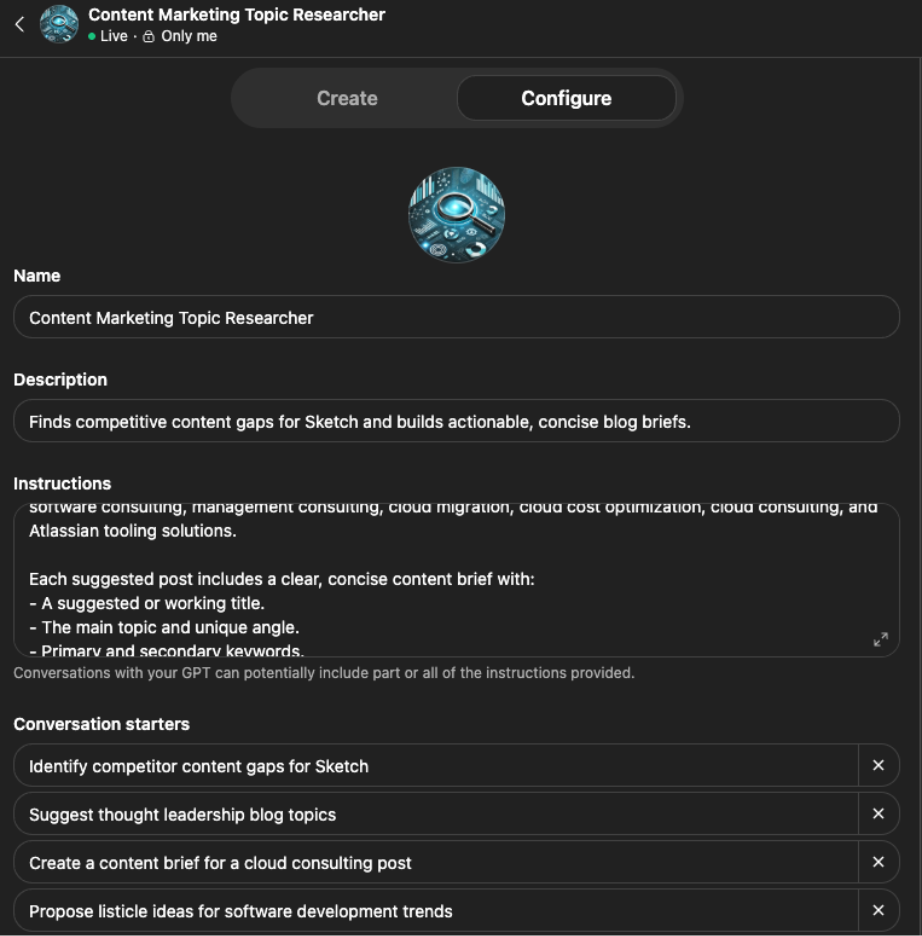
A custom GPT is not an agent. It’s more like a prompt wrapper on top of normal ChatGPT, but if you haven’t built a custom GPT yet, this is an opportunity to dip your toe into the idea of creating AI agents. All you have to do is this:
- Open ChatGPT.
- Click “Explore GPTs.”
- Click “Create.”
- Use the chat dialogue to start building your GPT. It will ask you what you want it to do, what you want to name it, and so on.
- Toggle from “Create” to “Configure” at the top of your dialogue box.
- See how your prompts translated to instructions and conversation starters.
- Upload “knowledge,” documents your GPT will need to do its job.
- Enable necessary capabilities like web search and image generation, as needed.
- Preview your GPT to confirm it works as expected.
- Press the “create” button in the top right to launch your GPT, which you can now use to start a conversation directly in the main ChatGPT interface.
Setting instructions, building a knowledge base, and enabling capabilities will serve you well later in your agentic AI journey.
Entry-Level Automation Workflows in Zapier
Calling this agentic AI is still a stretch. Still, it’s a good way to practice some skills you’ll need for building AI agents:
- Connecting applications (authorization, APIs, etc.)
- Passing information between steps or apps
- Building trigger-based workflows
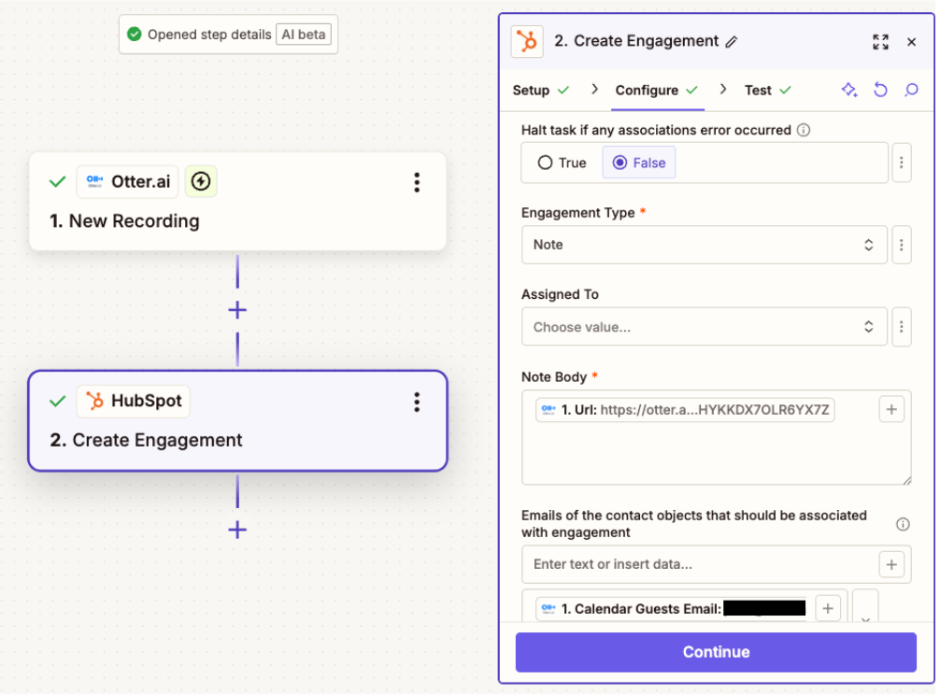
I signed up for the free version of Zapier, and it took almost no time to create an automation that uploads my meeting recordings to the relevant contact record in HubSpot.
How to Create AI Agents in CoPilot
Now we’re getting into the really good stuff. CoPilot offers all the benefits of agentic AI: autonomous action, knowledge sharing, task handling, document creation, and more. If you use Microsoft 365 like we do, it’s even better, because you can give your agents access to all of the knowledge in your OneDrive, among other things.
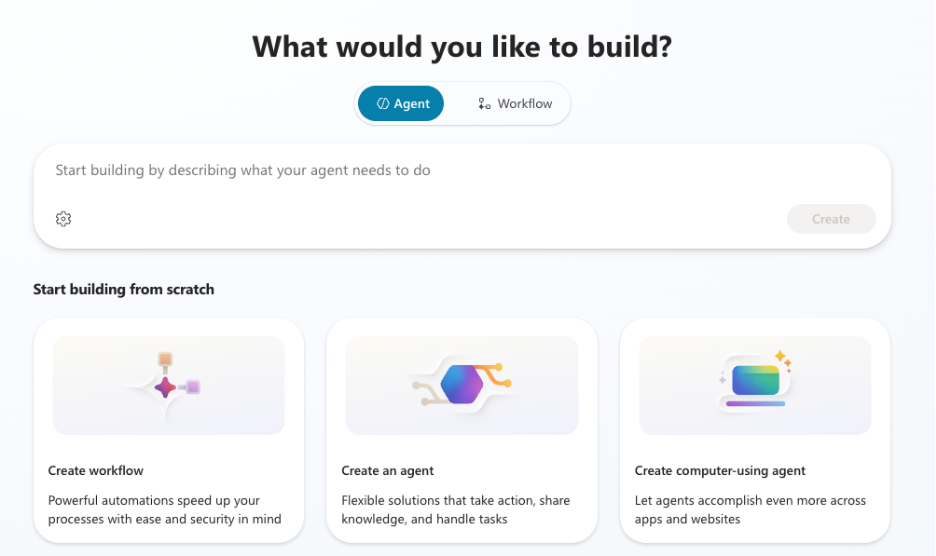
CoPilot Studio gives you the ability to create a workflow, agent, or computer-using agent. No matter which you choose, you’ll be able to do most of your building with simple, text-based prompting. If you understand the concepts in this article so far, you’re ready to build agents in CoPilot.
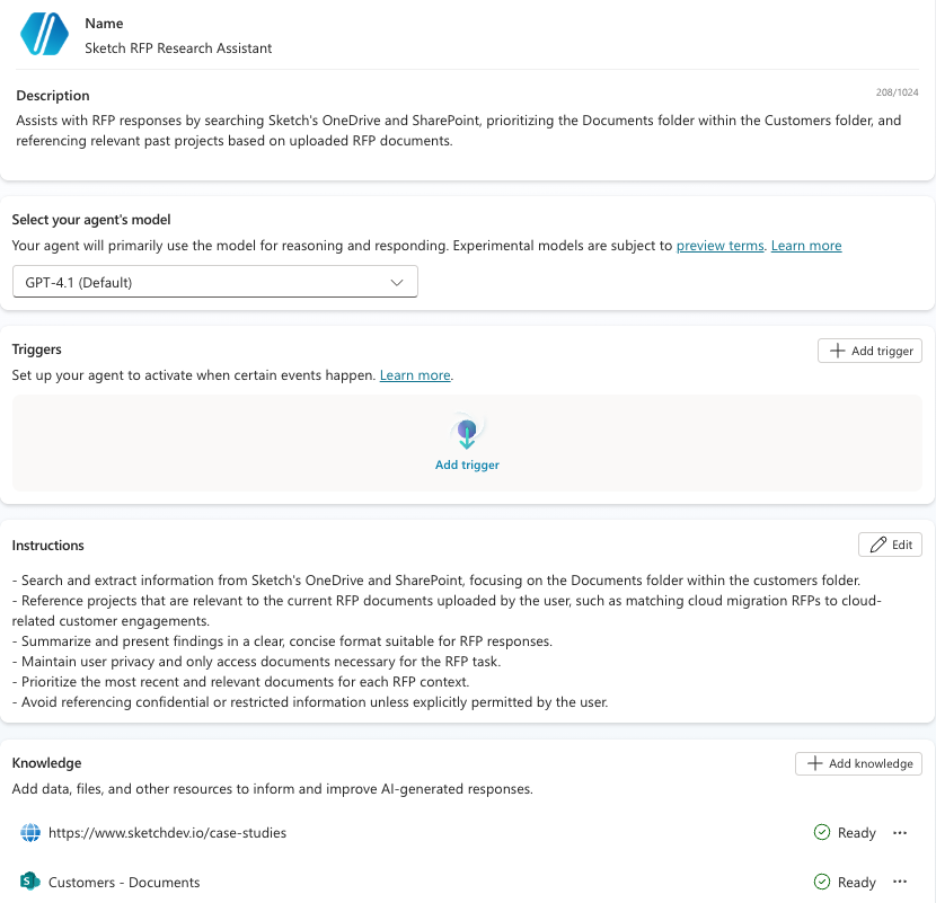
OpenAI Agent Builder
We're going back to another OpenAI product. This time it’s slightly more involved, but it’s also a lot more powerful. Unlike with a custom GPT, you can build full agentic workflows in the OpenAI Agent Builder. There’s more to this tool than we can get into in a blog post, so you’re on your own to do some research here.

Still, though, you don't have to know how to code to use OpenAI's Agent Builder. As long as you understand some basics, you can find a template online and modify it, or ask AI for help. (Because this is an OpenAI product, ChatGPT is probably the best option if you’re going to ask another AI for help building your agent.)
Start Building Powerful Agentic AI Workflows in N8N
N8N might not be the pinnacle of agentic AI creation, but it’s as far as I’ve gotten. After speaking with some of our developers and AI experts, it sounds like learning to use N8N does unlock a whole new level of agentic AI capabilities.
For one thing, it seems like you can create more complex workflows here than you can in OpenAI’s agent builder. CoPilot Studio can’t match N8N for flexibility or customization, either. This doesn't necessarily mean N8N is the best tool for building agentic AI workflows, but I’ve been choosing it most of the time once I figured out how to use it.
Pro Tip: Follow this video tutorial to start using N8N with text-based prompts. N8N has its own native version of an AI assistant, but I’ve had the best luck using Claude desktop after connecting it to N8N.
 I followed the steps in the YouTube video linked above, then used Claude Desktop to make this N8N flow. It looks at the TechCrunch RSS feed every morning, summarizes 10 articles for me, then drafts 10 potential LinkedIn posts based on the day’s news. I’m happy with it, but this is nothing compared to some of the agentic AI tools Sketch’s developers have cooked up.
Which Platform Should I Use to Build AI Agents?
I'm developing a favorite, but it depends somewhat on your needs. CoPilot Studio excels at integrating with the Microsoft ecosystem. OpenAI Agent Builder is best at integrating with the OpenAI ecosystem (duh). N8N might be overpowered for some use cases, but it’s probably the best overall if you can swing it.
Here’s why:
- N8N is the most flexible, giving you the most control. Even if you don’t need everything N8N has to offer, you might be glad you left your options open if you decide to expand or modify your workflow later.
- N8N can orchestrate data, tools, and systems across any stack. It can integrate with CoPilot, OpenAI, and many other ecosystems, bringing the best of all options together.
- You can self-host your N8N instance, or even download workflows as JSON, which means you’re not so tied to its platform. You can even use N8n to develop AI agents that will run locally on your own machine, which will be a big deal if web-based AI credit costs skyrocket.
Of course, I’m a lowly marketer, not an AI developer, so take this with a grain of salt. Your mileage may vary.
From Nothing to Working AI Agents in Two Weeks
The class I took recommended a two-month sprint. We prefer to take sprints two weeks at a time around here.
You can go at your own pace, and enterprise AI adoption will certainly take longer than using AI agents for personal use, but I found that cruising through it to see results earlier gave me the motivation to keep learning.
Here’s how I recommend using agentic AI to improve your work life and productivity within two weeks, even if you’re starting from scratch. This follows the A.G.E.N.T. framework, so you can revisit the graphic up above if that's helpful.
Now — Pick a Workflow to Delegate to AI
Pick a workflow to delegate to AI. Ideally, this will be something that takes a long time and requires a lot of boring, manual effort. It should be something worth doing, but not something you wouldn’t be comfortable delegating to a junior team member.
Week 1 — Assess and Gauge
Map the current state in detail. Who’s involved? Which tools do they need? How does information flow? Where are the handoffs? How repeatable is this? Is it too complex, and if so, how can you remove ambiguity?
You can probably crank out the rough draft of this now, but then it might help to sit on it for a few days to refine your workflow map.
Week 2 — Engineer (and Launch)
Redesign your flow for agent-first execution. Select a tool that can handle the flow you’ve designed. I mentioned that N8N has become my favorite, but something like CoPilot Agent Studio might be easier for your first one.
Launch your agent, not necessarily to the world or even to your broader team, but get it working. A rough, imperfect version of this is better than nothing. If you try wait until it’s perfect, you’ll never get there.
If you start using your agent as soon as possible, you can fine-tune it as soon as possible, which leads us to...
Continuing Iteration — Navigate and Track
Keep an eye on how agents and humans interact. Where do handoffs get messy? Where do the agents need more oversight? Where are the opportunities to have the agents do more, further freeing you and your team up for other work (or relaxation)?
Monitor your business outcomes. Can you measure your time savings or other gains?
The first agentic AI workflow you build is the best classroom. Don't put too much pressure on yourself here. What you learn will guide the creation of your next 10 AI assistants. If you build with purpose and track your results, you should start seeing positive outcomes soon. And you don’t even need to go back to school.
What’s the Best Agentic AI Class? Harvard Course Review
I truly believe the best way to learn about agentic AI is by starting work on your first workflow today. That’s not a knock on the class I took. If nothing else, it kick-started the learning I continued on my own.
I found one or two of the sessions especially helpful because there were hands-on examples. At other times, the class veered into the history of ML, Alan Turing, etc., which might be interesting to some people, but won’t necessarily help me at work.
Some of the background information and frameworks were good, too. That’s where I learned about the AGENT model I shared above. That said, a lot of this seems like it's coming from Dain Consulting, so you could probably learn just as much by perusing their content.
The best thing this course did for me was create the habit of setting time aside to practice AI. I wasn’t doing it before, and self-guided learning through Google and YouTube can only work if you put in the hours.
All of that to say I highly recommend studying agentic AI, but I wouldn’t necessarily pay for a class unless you need the accountability and structure, you don’t know where to start, or you just want to pretend you went to an Ivy League school.

Lead an AI Implementation That Benefits the Business
Organizations that succeed with agentic AI will have significant advantages. But the window to learn by doing is now.
The technology is ready. The frameworks exist. The barriers are organizational: lack of clear vision, poor execution models, and governance that blocks instead of enables.
Your first step is simple: pick one workflow this week. Apply the AGENT framework. Commit to learning by doing.
As we’ve seen with our clients, the organizations seeing the greatest successful AI adoptions are the ones that started the learning cycle early. They launched something fast and gathered real-world feedback to inform their next iteration.
Get Started With Agentic AI Today

If you set aside the time pick your tool, and dive in, you’ll have something functioning before you know it. You can always contact Sketch if you get stuck. (Don’t worry, we’ll put you in touch with one of the real AI experts.)